| View previous topic :: View next topic |
| Author |
Message |
jumalian
Ladies Man

Joined: 12 Jan 2003
Posts: 7625
City: san diego
|
 Posted: Apr 30, 2003 10:00 am Post subject: Adobe Premiere 6.5 help Posted: Apr 30, 2003 10:00 am Post subject: Adobe Premiere 6.5 help |
 |
|
I overlapped 2 clips and added a fading effect over the overlapping of the 2 clips, so that the first clip fades out as the second clip is fading in. When I play to preview, it just goes from the first clip to the next without the effect. How do I fix this?
Also, each clip looks like a clip w/ a bunch of dropped frames. If I make the clips "blend", then it plays normally as if all the frames are there. Is that normal? At one point do you check to see how many frames were dropped, if any? During capture?
Once captured, it showed up in the folder as a HUGE file! The size averaged from 18MB to 22MB! Most of the clips are of the cut into the wake, air, landing. Is that normal?
Thanks in advance for any help/tips you can give me.
_________________
my demo reel
DPC Films
| Aubs wrote: | | I'm thinking some island. And Alaska is not a choice. |
|
|
| Back to top |
|
 |
|
|
Zach M
Wakeboarder.Commie


Joined: 12 Jan 2003
Posts: 1638
City: Seattle
|
| Posted: Apr 30, 2003 10:07 am Post subject: |
|
|
It won't show you the effect unless you render the movie. Drag the preview bar over the effect and hit enter.
When you capture, it would tell you if frames were dropped. I don't think that's your problem, but I'm not sure what is. Make sure that your camera isn't still hooked into the computer when you're editing. When you preview your movie when the camera is plugged in, it plays smooth in the camera and choppy on the computer.
Movie files are big files. On average, 20 minutes of video is equal to 4 gigs of hard drive space. That's why you have to export your final cut to a smaller encoded file in order to have it on the internet.
Hope that helps. If you have any more troubles just ask.
|
|
| Back to top |
|
|
derrick lenz
Addict

Joined: 20 Jan 2003
Posts: 864
City: san antonio/ college station
|
| Posted: Apr 30, 2003 6:26 pm Post subject: |
|
|
| don't forget to over lap your clips some when your transitioning.the more they're overlapped the longer the transition will be. also like zach said you have to render the work area to see the transitions.
|
|
| Back to top |
|
|
Steelerguy
Addict
Joined: 12 Jan 2003
Posts: 518
|
| Posted: May 01, 2003 4:27 am Post subject: |
|
|
If you gonna steel the the software.... at least spend 40 bucks and buy a instructional book. ClassRoom in a book adobe 6.5 is really good. of course you could download adobe 6.0 bible in PDF from the same place.....
_________________
http://www.wakepics.com/member/Steelerguy
<p>
What do people mean when they say the computer went down on them!!!! |
|
| Back to top |
|
|
jumalian
Ladies Man
Joined: 12 Jan 2003
Posts: 7625
City: san diego
|
| Posted: May 01, 2003 7:08 am Post subject: |
|
|
I didn't steal the software. It was given to me.
Since I don't have the book yet, and Zach offered to help if I had anymore problems, for now, I'll get my answers here.
Thanks for the help, guys! Though my PC is only a Pentium2, it held up well during capture and didn't drop a single frame. whew! I did all the rendering, editing, re-rendering, etc. I've been able to preview. It's comin' out alright, so far.
Zach, you were absolutely right! Preview was fine, as long as the cam was off.
I have 65GB free space in my 2nd hard drive, so I'm not concerned (yet) w/ space. I was just a little shocked at the size for such a short clip.
Now, I've imported and added music to Audio 3. How do I delete Audios 1&2? Do I just un-click it on the right?
Also, when I save, it saves as Premiere project. At what point do I save it as a .wmv or .mpg, and how? What do I use to compress the video so I can upload it on Wakeboarder.com's Media Center or onto Wakepics? What's the size limit, 25MB?
Again, thanks for the help!
_________________
my demo reel
DPC Films
| Aubs wrote: | | I'm thinking some island. And Alaska is not a choice. |
|
|
| Back to top |
|
|
scott a
Ladies Man

Joined: 13 Jan 2003
Posts: 9810
|
| Posted: May 01, 2003 10:04 am Post subject: |
|
|
joe i keep all of my videos to 10mb. the wakeboarder limit is 10, and 10 seems to work well for wakepics so i would shoot for that.
when your entire project is done and rendered, then you export it. i have it all explained on the gowakin board. good luck.
_________________
www.TheLiquidPlayground.com
Integrity Wakeskates |
|
| Back to top |
|
|
Zach M
Wakeboarder.Commie
Joined: 12 Jan 2003
Posts: 1638
City: Seattle
|
| Posted: May 01, 2003 1:20 pm Post subject: |
|
|
Are audio 1 and 2 the sounds from the imported video? If they are, you have to click "toggle sync mode" to separate the video and audio clips. Click it so the little 8 disappears. Then, click on the audio clips you want to delete. It should be selected, but the video should not. Then just click delete. (I included pictures).
Once you want to export your video, go to
<file>
<export timeline>
<movie>
This will export your video to a high quality .avi. This is for high quality playback on your own computer. The only problem is that it takes up a lot of space. I always save one copy of my video on my second harddrive to ensure it won't get lost. Also, you can export it back to your video camera to save a copy of your edited video there.
If you want to export it for playback on the web, go to
<file>
<export timeline>
<save for web>
After this, you can pick what format you want to export it as. I usually use .wmv for online stuff, but mpeg and quicktime are also ok.
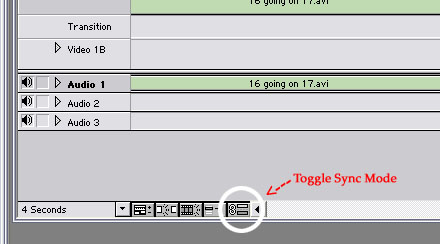
|
| Description: |
| Here is where toggle sync mode is. |
|
| Filesize: |
20.58 KB |
| Viewed: |
2118 Time(s) |
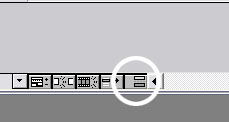
|
| Description: |
| It should look like this after you click it. |
|
| Filesize: |
6.19 KB |
| Viewed: |
2118 Time(s) |
|
|
| Back to top |
|
|
derrick lenz
Addict
Joined: 20 Jan 2003
Posts: 864
City: san antonio/ college station
|
| Posted: May 01, 2003 1:27 pm Post subject: |
|
|
| joe i use premeire 6.0 so it may differ a little from 6.5 but to erase the audio from you video you need to lock the video in place. in the video one bar all the way to the left there should be a little empty box. when you click on it a little lock shoud appear in the box. that mean the video is locked in place(i.e. can edit it or delete it now). then just go to audio one, right click, and select delete. this will erase the audio but leave the video. to edit video one simply go back unclick the little lock. once again i use 6.0 not 6.5 so it may be a little different but i think it probably would have stayed the same. and about steelerguy don't worry about him. when i was learning he'd complain and tell me to buy the book too. i find it much more helpful to use the board since i'm computer illtierate. also in oreder to put the file on the net you need to compress it. to do this go to file->expor timeline->movie. from there you can choose the type of file and how much you want to compress it. this part is pretty hard to get it where you want it but if you hit me up on aim i'd be willing to help and walk you through. my name is dlenz2006. also one person that was a lot of help with this for me was billj. he's really good with this stuff.
|
|
| Back to top |
|
|
BillJ
Wakeboarder.Commie
Joined: 15 Jan 2003
Posts: 1568
City: San Diego
|
| Posted: May 01, 2003 4:06 pm Post subject: |
|
|
An easier way is to just mute the track. See the little speaker symbol at the left side of the Audio track in the pic that Zach posted? Just click it to mute that track. Really easy.
Thanks for the tip about sync mode. I somehow turned it off and I didn't know how - so I would move a video clip but the audio wouldn't move with it.
|
|
| Back to top |
|
|
Zach M
Wakeboarder.Commie
Joined: 12 Jan 2003
Posts: 1638
City: Seattle
|
| Posted: May 01, 2003 4:59 pm Post subject: |
|
|
| when you mute the track, does it mute it when you export? I haven't tried that, but it seems like that might just be a way to turn the sound off to work on another track. Like when you're in photoshop, if you turn off the view of a layer, it still shows up in the exported file.
|
|
| Back to top |
|
|
jumalian
Ladies Man
Joined: 12 Jan 2003
Posts: 7625
City: san diego
|
| Posted: May 01, 2003 6:35 pm Post subject: |
|
|
Thank you very very very much!!! Hopefully, the vid will be done tonight, and uploaded!
Zach, off topic, but where in Seattle do you ride? You should ride w/ me and the World Famous Funkster!
I'm gonna go have some dinner, chill out, then work on the vid. I'll let you guys know how it goes.
Derrick, thanks a ton, man! I dig the screen shots...helps dummies like me! heh!
_________________
my demo reel
DPC Films
| Aubs wrote: | | I'm thinking some island. And Alaska is not a choice. |
|
|
| Back to top |
|
|
jumalian
Ladies Man
Joined: 12 Jan 2003
Posts: 7625
City: san diego
|
| Posted: May 01, 2003 7:29 pm Post subject: |
|
|
Okay, I lied. I might not be done tonight. I started over. I want to make the video and the music sync. I'm workin' at a decent pace, so there's a chance that I could finish tonight. We'll see.
_________________
my demo reel
DPC Films
| Aubs wrote: | | I'm thinking some island. And Alaska is not a choice. |
|
|
| Back to top |
|
|
Zach M
Wakeboarder.Commie
Joined: 12 Jan 2003
Posts: 1638
City: Seattle
|
| Posted: May 01, 2003 10:05 pm Post subject: |
|
|
| I actually am from Portland, I'm just at school in Seattle. I'm itching for a pull, but I haven't had any free time. I'm not sure if I'll have much free time until classes are over. We'll see. I'd love to ride with you guys sometime.
|
|
| Back to top |
|
|
jumalian
Ladies Man
Joined: 12 Jan 2003
Posts: 7625
City: san diego
|
| Posted: May 01, 2003 10:19 pm Post subject: |
|
|
Email Funk or me if/when you want to ride. I'll do what I can to get us a pull or two. It's warmin' up now so it'll get easier to find someone wanting to take their boat out.
Back to the vid...
1st compression, it went from 729MB to 129MB.
2nd compression is on a 16MB pace.
I gotta learn how to compress to .wmv. I'm compressing to Quicktime now. Is there a website that can show me that?
_________________
my demo reel
DPC Films
| Aubs wrote: | | I'm thinking some island. And Alaska is not a choice. |
|
|
| Back to top |
|
|
jumalian
Ladies Man
Joined: 12 Jan 2003
Posts: 7625
City: san diego
|
|
| Back to top |
|
|
Zach M
Wakeboarder.Commie
Joined: 12 Jan 2003
Posts: 1638
City: Seattle
|
| Posted: May 02, 2003 12:15 am Post subject: |
|
|
Sweet vid! You've got a great eye for editing. Super chill music and nice cuts.
Next time fade the music out at the end. It makes for a cleaner ending. Also, your effects at the beginning seemed to be cut short. I'm not sure why.
|
|
| Back to top |
|
|
BillJ
Wakeboarder.Commie
Joined: 15 Jan 2003
Posts: 1568
City: San Diego
|
| Posted: May 02, 2003 8:55 am Post subject: |
|
|
| Zach, I tested exporting (creating a Quicktime movie) using the audio track mute and it worked just fine. I muted Audio 1 only and the output had Audio 2 but not Audio 1, just as I thought it would.
|
|
| Back to top |
|
|
Zach M
Wakeboarder.Commie
Joined: 12 Jan 2003
Posts: 1638
City: Seattle
|
| Posted: May 02, 2003 10:04 am Post subject: |
|
|
| sweet, thanks for the tip
|
|
| Back to top |
|
|
jumalian
Ladies Man
Joined: 12 Jan 2003
Posts: 7625
City: san diego
|
|
| Back to top |
|
|
|
|
|

 FAQ
FAQ Search
 Memberlist
 Stats
Stats Favorites
 Register
 Profile
 Log in to check your private messages
 Log in


